
Monica AI Review: Extension, Chat Assistant & Podcast Generator
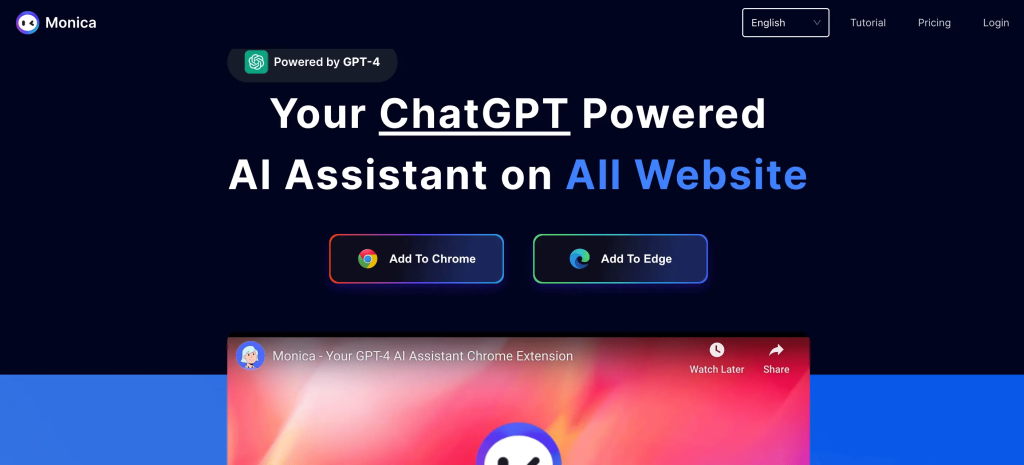
If you’ve been curious about Monica AI, you’ve likely seen it described as a powerful AI assistant that stays directly in your browser. Unlike many other AI tools that require you to switch tabs, Monica AI works as an extension, allowing you to chat, translate, summarize, and even generate podcasts without interrupting your flow. But how reliable is it? And is the Monica AI login and setup as smooth as promised?
At Roareye, we love to test tools like these to see if they truly make life easier or if it’s just another overhyped app.
What Monica AI Can Do for You
The Monica AI extension is designed to feel like a sidekick that’s always ready to help. Once it’s installed in Chrome or Edge, you can highlight any text and instantly ask Monica to summarise, translate, or explain it.
Instead of jumping to another tab to use ChatGPT, the Monica AI chat shows up right on the same page, just to the right side. Whether you’re creating emails, writing blog posts, or brainstorming captions, Monica offers AI-powered suggestions without interrupting your work.
Monica AI Podcast Generator
One of its more creative features is the Monica AI podcast generator, which lets you turn scripts or articles into audio. While the voice still sounds a bit robotic, it’s a way to repurpose content or experiment with short audio snippets.
At Roareye, we believe that AI tools are more than just apps; they’re becoming invisible assistants built directly into our daily tools. Which means we ought to be more careful of how we use these tools.
Want to explore how AI tools like Monica can boost your brand?
Monica AI Pricing: Free vs Paid
Like most AI tools, Monica AI has both free and paid plans. The free version is useful if you just want to try out the extension, but the daily limits run out quickly. Paid plans provide unlimited access, quicker chat responses, and additional features, but there is a drawback.
Many users have noticed that Monica’s customer support has become less reliable. That makes paying annually risky, even though the assistant itself works smoothly.
Best Plan for Beginners
The free plan is great if you want to see how Monica AI fits into your workflow. You’ll quickly see how features like its summarisation, translation, and AI chat assistant work. But once you hit the daily limit, you’ll have to wait until the next day to continue using it.
Best Plan for Heavy Users
If you’re planning to use Monica for school projects, marketing campaigns, or everyday productivity, the paid plan is a better choice. It unlocks unlimited access and removes delays. Still, with support being weak, a monthly plan is safer than locking into a full year.
Monica AI Chat: A Small But Useful Difference
The Monica AI chat doesn’t try to replace ChatGPT but makes conversations more easier. With Monica AI you don’t have to switch tabs because it is already in your sidebar, ready to explain articles, answer quick questions, or help brainstorm content.
Use Cases of Monica AI Chat
Imagine you are reading a French article and you need a translation on the spot, or you are creating a blog post and asking Monica AI to suggest catchy headlines without leaving your page. This is where Monica AI assistant leads as the most accessible chatbot because it is always within reach.
Getting Started with Monica AI Login
Signing up for Monica AI is simple. You install the extension, then use your Google, Apple, or email account to log in.
That said, some users have run into login problems, such as endless loops or pages not loading.
Common Monica AI Problems and How to Fix Them
Monica AI Login Keeps Refreshing
Why It Happens
This usually happens because browser cookies are corrupted, VPNs interfere with authentication, or cached sessions become stuck. Some ad blockers can also prevent Monica AI from loading correctly.
How to Fix It
Clear Browser Cookies and Cache
- Open Chrome or Edge
- Go to Settings
- Click Privacy & Security
- Select Clear Browsing Data
- Tick Cookies and Cached Files
- Restart the browser
- Try logging in again
Disable VPN Temporarily
Some VPN servers block Monica AI authentication requests. Turning off the VPN usually fixes the issue instantly.
Turn Off Ad Blockers
Extensions like uBlock Origin or Brave Shields may block Monica’s login scripts. Disable them briefly and refresh the page.
Try Incognito Mode
Incognito mode disables conflicting browser extensions and often resolves login loops.
Monica AI Sidebar Not Working
Why It Happens
The Monica AI sidebar may fail to open or respond because of:
- browser extension conflicts
- disabled permissions
- outdated browser version
- heavy or unsupported websites
- temporary extension glitches
Users usually notice:
- sidebar not appearing at all
- sidebar freezing on load
- buttons not responding
- blank panel on the side of the screen
How to Fix It
Refresh the Page
Most temporary glitches are fixed by simply refreshing the webpage.
Check Extension Permissions
- Go to Chrome/Edge Extensions
- Find Monica AI
- Click “Manage”
- Ensure all permissions are enabled
Disable Conflicting Extensions
Turn off extensions like:
- ad blockers
- script blockers
- privacy tools
Then reload the page.
Update Your Browser
An outdated browser can break sidebar features.
- Update Chrome or Edge to the latest version
Restart the Extension
- Turn Monica AI off
- Turn it back on
- Reload your browser
Common Issues
The most frequent problems are login pages refreshing endlessly, failing to load, or blocking sign-in when VPNs and ad blockers are turned on. These small glitches can be frustrating, especially if you’re trying to access the Monica AI assistant quickly during work.
Quick Fixes
Luckily, most Monica AI login issues are easy to fix. Clearing cookies resets the session, incognito mode can bypass extension issues, and disabling VPNs usually solves the problem.
Monica AI Free Limit Runs Out Quickly
Why It Happens
The free version of Monica AI has strict daily usage limits. Once you hit the limit, the extension stops generating responses until it resets the next day. This is a built-in restriction, not a bug.
Users usually notice:
- “limit reached” messages
- blocked AI responses
- inability to continue chats or summaries
How to Fix It
Wait for Daily Reset
The simplest solution is to wait until the next day when your free quota refreshes automatically.
Upgrade to a Paid Plan
If you use Monica AI frequently for work or study:
- upgrade to unlock unlimited access
- remove daily restrictions
- get faster response times
Use Only High-Value Prompts
To stretch your free usage:
- avoid repeated or vague prompts
- combine questions into one request
- use summarization instead of multiple chats
Switch to Lightweight Tasks
Instead of heavy AI usage:
- use it for summaries only
- avoid long back-and-forth chats
Monica AI Podcast Generator
One of the standout features is the Monica AI podcast generator. You can give it a blog post or ask it to draft a script, then select a voice to create audio. The result isn’t perfect because at times the voices can sound robotic, but it’s a good way to start.
Who Will Love It
The podcast feature is best for casual creators, educators, or marketers who want to experiment with audio content. It’s not ready to replace a professional studio setup, but for quick summaries, educational explainers, or bite-sized podcasts, it does the job.
The Big Question: Is Monica AI Reliable?
Here’s the trade-off: the Monica AI assistant works smoothly, but customer support has slowed down. Users on Reddit have reported waiting weeks without replies, and updates to the tool have become less frequent.
That makes Monica AI a handy AI assistant but not the most reliable choice if you plan to depend on it daily. Want to build your AI-ready marketing strategy?
Get to Know Roareye
At Roareye, we’re all about helping brands stay ahead with digital tools, strategies, and creative content that work. We help brands learn to use AI assistants like Monica AI, boost online presence with our SEO services, and create effective digital strategies for the future.
Ready to create those strategies that transform the future of your brand? Let’s make your marketing smarter, faster, and more impactful.
FAQ
Q: How do I install Monica AI?
A: Go to the Chrome Web Store, click “Add to Chrome,” and pin the extension.
Q: Why won’t Monica AI let me log in?
A: Clear cookies, disable VPN/ad blockers, or try incognito mode.
Q: Can it really make podcasts?
A: Yes, it turns text into audio. We recommend editing before publishing.
Q: Is Monica AI free?
A: Yes, but you only get limited daily uses. The paid version gives you more access.