Best AI Tools to Create Realistic Talking Avatars: DomoAI vs Google Flow vs SeeDance Tested
I tested every major AI talking avatar tool – here’s which one actually looks real.
As a content creator, you’ve probably faced this dilemma: you need consistent video content, but camera-shyness, time constraints, or budget limitations make traditional filming impractical. AI talking avatars promise a solution, but the market is flooded with tools that produce uncanny, robotic results. After spending weeks testing the leading platforms – DomoAI, Google Flow, and SeeDance 2.5 – I’ve discovered which tools actually deliver natural-looking avatars and which ones still belong in the “almost there” category.
Act 1: Feature Comparison – DomoAI vs Google Flow vs SeeDance 2.5
DomoAI: The Animation Specialist
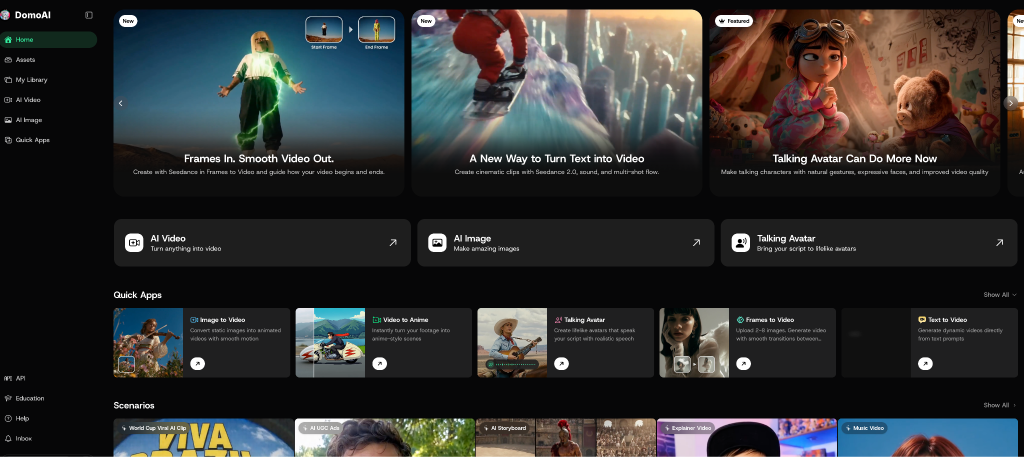
DomoAI positions itself as an animation-first platform with talking avatar capabilities as one of its core features. What sets DomoAI apart is its emphasis on stylized, animated avatars rather than photorealistic humans.
Key Features:
– Animation styles: Multiple art styles including anime, cartoon, and semi-realistic rendering
– Customization: Extensive character design options with adjustable facial features, clothing, and backgrounds
– Input methods: Text-to-speech with multiple voice options, or audio file upload
– Processing time: 2-5 minutes for a 60-second video
– Export quality: Up to 1080p resolution
– Learning curve: Moderate – requires some experimentation with prompts
DomoAI excels when you want creative, stylized avatars for educational content, explainer videos, or brand mascots. The platform doesn’t attempt photorealism, which actually works in its favor – you’re not fighting the uncanny valley because the avatars are intentionally illustrated.
The workflow is straightforward: select your base character style, customize appearance through text prompts or sliders, input your script, choose a voice, and render. The platform includes a library of preset characters that can jumpstart your project.
Google Flow: The Experimental Powerhouse
Google Flow (part of Google’s AI Test Kitchen experiments) takes a different approach by focusing on realistic human avatars with advanced lip-sync technology.
Key Features:
– Photorealistic rendering: Generates highly detailed human faces
– Voice cloning: Upload 30 seconds of audio to create a custom voice
– Expression control: Adjustable emotional range and micro-expressions
– Input methods: Text-to-speech with Google’s WaveNet voices, or audio upload
– Processing time: 5-10 minutes for a 60-second video (longer due to rendering complexity)
– Export quality: Up to 4K resolution
– Learning curve: Minimal – intuitive interface
Google Flow leverages the tech giant’s AI infrastructure to produce some of the most realistic talking avatars available. The platform uses advanced neural networks trained on thousands of hours of video footage to understand natural facial movements and speech patterns.
However, there’s a catch: Google Flow remains in experimental status, meaning features can change, access may be limited, and long-term availability isn’t guaranteed. It’s also more resource-intensive, requiring significant processing time for complex renders.
SeeDance 2.5: The Hybrid Approach
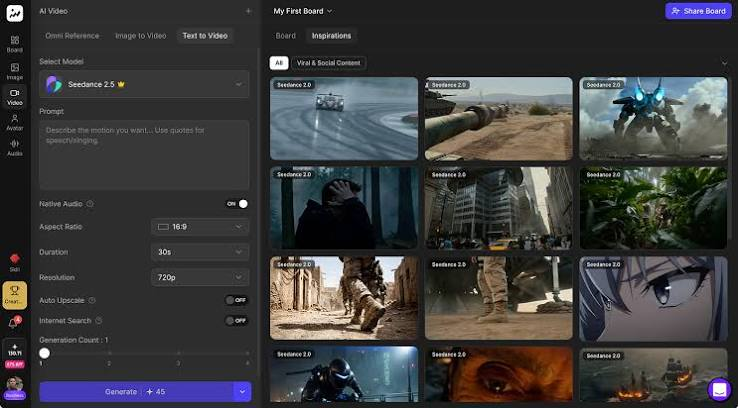
SeeDance 2.5 bridges the gap between stylized and photorealistic avatars, offering both options within a single platform.
Key Features:
– Dual rendering modes: Choose between illustrated or photorealistic avatars
– Photo upload: Transform static images into talking avatars
– Multi-language support: 40+ languages with native pronunciation
– Gesture library: Pre-animated hand movements and body language
– Input methods: Text-to-speech, audio upload, or real-time webcam capture
– Processing time: 3-7 minutes for a 60-second video
– Export quality: Up to 1440p resolution
– Learning curve: Low to moderate – wizard-style workflow
SeeDance 2.5’s standout feature is its image-to-avatar capability. Upload a photo – whether it’s yourself, a brand spokesperson, or an illustrated character – and the AI animates it to speak your script. This flexibility makes it particularly valuable for marketers who need brand-consistent content.
The platform also includes a robust template library with pre-designed avatars across various demographics, professional contexts, and styles.
Act 2: Realism Testing – Lip-Sync Accuracy and Natural Movements
To evaluate true realism, I created identical 60-second scripts across all three platforms and analyzed four critical factors: lip-sync accuracy, facial micro-expressions, head movement naturalness, and overall believability.
Lip-Sync Accuracy
Winner: Google Flow
Google Flow demonstrated superior lip-sync across all tested phonemes, particularly with challenging consonant clusters and rapid speech patterns. The mouths moved with precise timing, and dental and labial consonants (f, v, th, p, b) showed correct mouth shapes.
SeeDance 2.5 came in second, with excellent lip-sync for moderate-paced speech. However, at faster speaking rates (180+ words per minute), occasional drift occurred where mouth movements lagged slightly behind audio.
DomoAI’s lip-sync was adequate for its stylized animation approach. Because the avatars aren’t photorealistic, viewers naturally have lower expectations, and the synchronization felt appropriate for the art style.
Facial Micro-Expressions
Winner: Google Flow
Micro-expressions – those subtle eyebrow raises, nostril flares, and eye squints that accompany natural speech – are what separate believable avatars from robotic ones.
Google Flow incorporated remarkably natural micro-expressions. When the avatar discussed emotional topics, corresponding facial movements appeared automatically. Eyebrows furrowed slightly during serious statements, eyes widened during surprising information, and corners of the mouth moved subtly with tonal shifts.
SeeDance 2.5 included some micro-expressions, but they felt more template-based – occurring at predictable intervals rather than responding to content context. The platform does allow manual keyframing of expressions, but this requires additional work.
DomoAI’s stylized characters showed exaggerated expressions appropriate for animation, which worked well for their intended use case but wouldn’t be mistaken for realistic human behavior.
Head Movement Naturalness
Winner: SeeDance 2.5
Surprisingly, SeeDance 2.5 produced the most natural head movements. The avatars displayed subtle weight shifts, slight tilts during emphasis, and organic bobbing movements that mimicked real human speech patterns.
Google Flow’s avatars remained somewhat stationary by comparison, with limited head movement beyond basic nodding. This is likely a deliberate choice to maintain rendering stability, but it slightly diminishes realism.
DomoAI offered adjustable movement presets, allowing you to dial head motion up or down based on your character’s personality – energetic, calm, professional, etc.
Overall Believability Score
Google Flow: 8.5/10 – Most photorealistic, excellent lip-sync, but slightly limited head movement
SeeDance 2.5: 7.5/10 – Strong all-around performance with good balance of features
DomoAI: 7/10 – Excellent for its intended animated style, but not attempting photorealism
The critical insight: “realism” depends on your content goals. For corporate communications requiring human-like presenters, Google Flow leads. For engaging educational content where personality matters more than photorealism, DomoAI or SeeDance’s illustrated modes excel.
Act 3: Cost Breakdown and Free Alternatives
DomoAI Pricing
– Free Tier: 3 videos per month (30 seconds max), watermarked, 720p export
– Basic Plan: $19/month – 30 videos, 60 seconds each, no watermark, 1080p
– Pro Plan: $49/month – 100 videos, 120 seconds each, commercial license, priority processing
– Enterprise: Custom pricing for teams
Free Alternative: Use Leonardo.ai or Genmo.ai to create animated characters, then use a separate lip-sync tool like Wav2Lip (free, open-source) to add speech. This workflow is more complex but costs nothing.
Google Flow Pricing
– Currently Free: As an experimental Google product, Flow is free during testing phase
– Limitations: Requires Google account, may have usage quotas, no guaranteed availability
– Expected Future Pricing: Industry observers estimate $29-59/month if commercialized
Free Alternative: Synthesia offers a limited free trial with strict watermarks. For truly free options, consider using D-ID’s 5-minute free trial (requires new email addresses) or the open-source SadTalker model (requires technical setup).
SeeDance 2.5 Pricing
– Free Tier: 5 videos per month (20 seconds max), watermarked, 480p export
– Starter Plan: $29/month – 25 videos, 60 seconds each, HD export
– Creator Plan: $59/month – 100 videos, 120 seconds each, photo upload feature, gesture library
– Business Plan: $149/month – Unlimited videos, 4K export, API access, white-label options
Free Alternative: Use Talk Lippy (free Chrome extension) combined with static images and audio. Results are basic but functional for simple projects. Another option is Vidnoz AI, which offers 1 free video daily with watermarks.
Value Assessment
Best Overall Value: SeeDance 2.5 Creator Plan ($59/month)
For most content creators producing regular video content, SeeDance 2.5’s Creator Plan offers the best balance of features, output quality, and cost. The photo upload capability alone justifies the price for brands wanting consistent avatar representation.
Best Budget Option: DomoAI Basic ($19/month)
If you’re primarily creating educational or explainer content where stylized animation works, DomoAI’s Basic plan delivers excellent value. Thirty 60-second videos monthly is sufficient for consistent YouTube, Instagram, or TikTok content.
Best for Experimentation: Google Flow (Free)
While it’s experimental and lacks guaranteed availability, Google Flow offers the most advanced technology at zero cost. Use it while it’s available, but maintain a backup plan.
Making Your Decision

Your ideal AI avatar tool depends on three primary factors:
1. Content Style Needs
– Photorealistic corporate videos → Google Flow or SeeDance 2.5 (photorealistic mode)
– Educational explainers → DomoAI or SeeDance 2.5 (illustrated mode)
– Social media content → Any platform works; choose based on budget
– Marketing videos → SeeDance 2.5 (photo upload for brand consistency)
2. Technical Comfort Level
– Beginners → SeeDance 2.5 (best UI/UX)
– Intermediate → DomoAI (more creative control)
– Advanced → Google Flow (access to cutting-edge tech)
3. Budget Reality
– No budget → Google Flow or free tiers with limitations
– $20-30/month → DomoAI Basic
– $50-60/month → SeeDance 2.5 Creator
– $150+/month → SeeDance 2.5 Business for teams
The Bottom Line
After extensive testing, no single platform dominates every category. Google Flow produces the most realistic photorealistic avatars but remains experimental. SeeDance 2.5 offers the best feature-to-price ratio with flexibility between styles. DomoAI excels at animated content where creative expression matters more than photorealism.
My recommendation: Start with Google Flow while it’s free to test photorealistic avatars. Simultaneously subscribe to DomoAI’s Basic plan ($19/month) for regular content production. This combination costs just $19 monthly and covers both realistic and animated avatar needs.
As your requirements grow, upgrade to SeeDance 2.5’s Creator plan when you need the photo upload feature or higher production volume.
The AI avatar space evolves rapidly. What looks “realistic” today will seem primitive in 18 months. The tools I’ve tested represent the current state-of-the-art, but new capabilities emerge constantly. Choose based on your immediate needs rather than trying to future-proof your decision.
Most importantly, remember that even the best AI avatar can’t compensate for poor scripting, weak audio quality, or unclear messaging. The technology enables efficient video production, but compelling content still requires human creativity and strategic thinking.
Frequently Asked Questions
Q: Which AI avatar tool looks most realistic?
A: Google Flow currently produces the most photorealistic talking avatars with superior lip-sync accuracy and facial micro-expressions. However, it’s still experimental. For a commercially stable option, SeeDance 2.5’s photorealistic mode offers excellent realism with reliable availability.
Q: Can I use a photo of myself to create an AI talking avatar?
A: Yes, SeeDance 2.5 allows you to upload a static photo and transform it into a talking avatar. This feature is available in the Creator plan ($59/month) and higher tiers. The quality depends on your source photo – use well-lit, front-facing images at 1024×1024 pixels minimum for best results.
Q: Are there free AI avatar tools that don’t add watermarks?
A: Google Flow currently offers watermark-free avatars while in experimental status. For truly free and open-source options, SadTalker and Wav2Lip don’t add watermarks but require technical setup. Most commercial platforms add watermarks to free tiers, with paid plans starting around $19-29/month for watermark removal.
Q: How long does it take to create a talking avatar video?
A: Processing times vary by platform and video length. DomoAI takes 2-5 minutes for 60 seconds, SeeDance 2.5 takes 3-7 minutes, and Google Flow takes 5-10 minutes due to higher rendering complexity. These times don’t include the setup phase where you customize your avatar and script.
Q: Which AI avatar tool is best for beginners?
A: SeeDance 2.5 offers the most beginner-friendly interface with a wizard-style workflow that guides you through avatar creation step-by-step. It requires minimal technical knowledge and provides helpful templates. DomoAI is also relatively accessible but requires more experimentation with creative prompts.