
How to Delete Account From Uber Using Two Simple Methods

Are you currently looking for how to delete account from Uber in Canada? You are not alone. It isn’t always as simple as tapping “delete.” With privacy laws, data retention, and common technical issues, it can get quite confusing when trying to delete Uber Account .
But don’t worry, we’ll walk you through everything step-by-step so you know exactly what to do if you suddenly see your Uber account deactivated or if Uber refuses to delete your account.
At Roareye, we help Canadians and businesses navigate the digital world with confidence. Let’s get started.
Why Most People Delete Uber Accounts in 2025
Uber has been the go-to for quite a while in the USA, but lately quite a number of people are looking for how to delete account from Uber. You may ask, why? There was a lawsuit filed by the FTC in 2025 that accused Uber of deceptive billing practices and tricky cancellations related to their Uber One plan.
In addition, many users have been complaining about hidden fees, missing orders, sudden account deactivation, and poor support. While Uber claims that their practices are legal and that it’s now easier to cancel orders, it seems like many customers have already lost trust in the brand.
Talking about trust, Roareye is definitely a digital marketing partner that you can trust to help you establish and grow your brand online. No funny business, just plain value and results.
Step-by-Step Guide to Delete Uber Account
If you are looking for how to delete Uber account, you can do it through the app or the website. The two methods work well, although there are a few differences. Here’s a simple guide to help you through the process.
How to Close Uber Account Using the Uber App
- Open the Uber app and tap Settings.
- Go to Privacy and then choose Delete Your Account.
- Follow the prompts, verify via SMS or email, and confirm.
- Uber will deactivate your account right away, and it will be permanently deleted after 30 days.
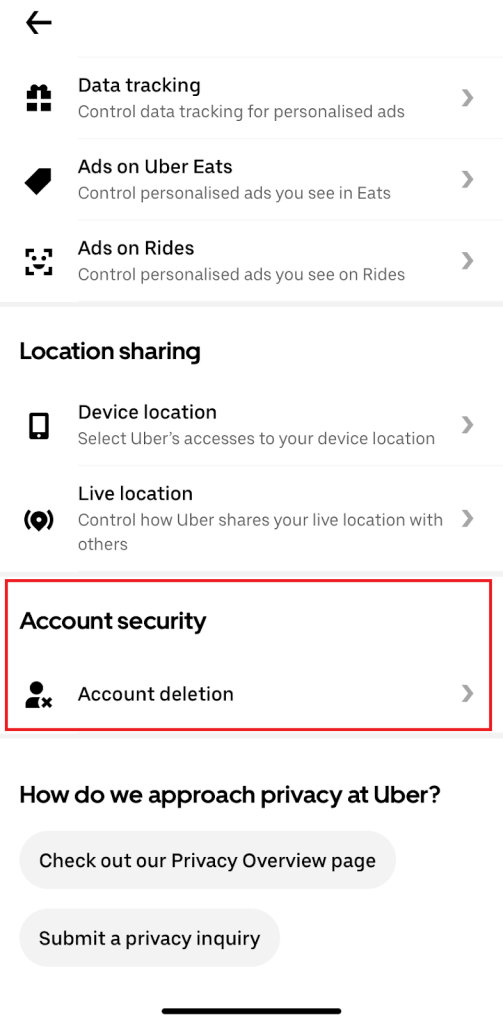
Alt text: How to Close Uber Account Using the Uber App
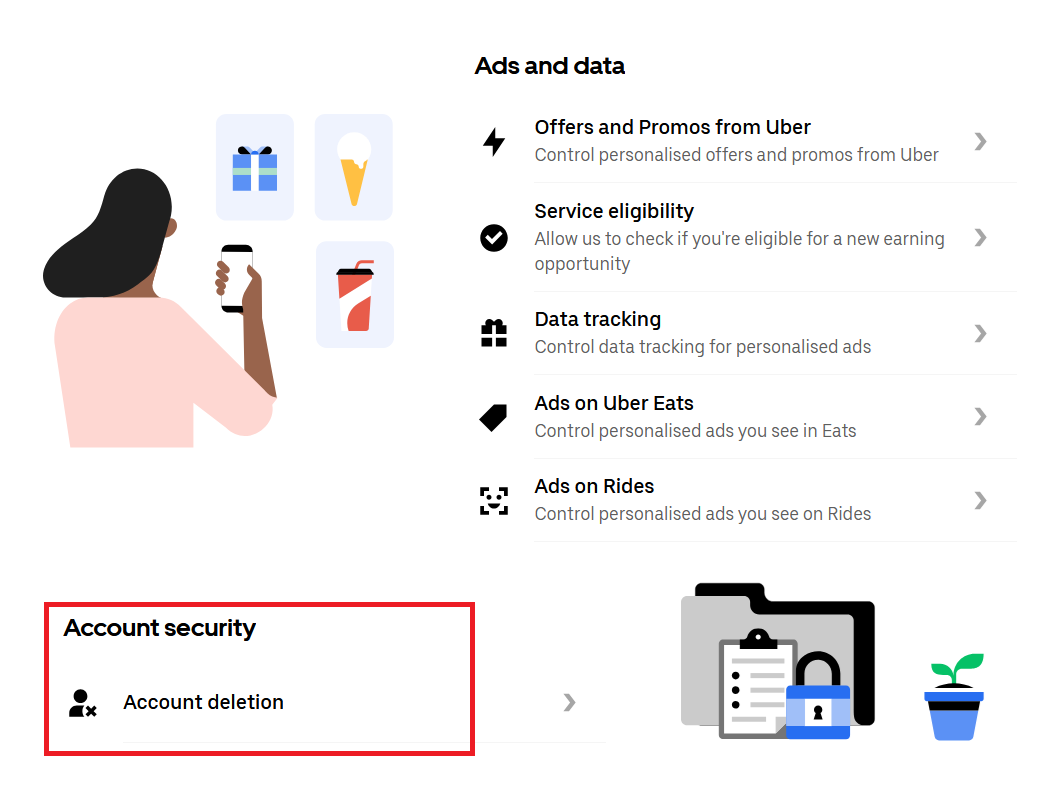
How to Delete Account from Uber using the Uber Website
- Visit help.uber.com.
- Log in and navigate to Delete My Uber Account.
- Fill out the short form and specify whether you want to delete Uber Rider, Uber Eats, or both.
- You’ll receive a confirmation message that your deletion request is pending.
You should know, though, that if you have an Uber Eats account using the same account details, it will also be deleted when your request is complete.
Understanding Uber Account Deactivation and Privacy
Before you hit delete, it helps to understand why Uber keeps some of your information. This will make sense of what happens after you request to delete Uber account and what rights you have as a Canadian user.
Why Uber Retains Your Data
Uber, like most companies, must comply with Canadian and international financial laws that require companies to retain transaction records for up to seven years. This includes receipts, payment history, and related tax information.
Your Rights Under Canadian Privacy Laws
Under PIPEDA, Canadians have the right to:
- Request deletion or anonymization of personal data.
- Know what data is being stored.
- Request confirmation that a deletion request has been completed.
If Uber does not respond within 30 days, you may file a complaint with the Office of the Privacy Commissioner of Canada (OPC).
What If Uber Refuses to Delete Your Account?
It’s frustrating when it seems like your request to have your Uber account deactivated is being ignored. Here’s what might be causing it — and what you can do next.

Possible Reasons Uber Might Deny Deletion
Common reasons include:
- Pending payments or refunds.
- Account verification or fraud checks.
- Legal or financial record requirements.
How to Escalate your Request
If Uber ignores your deletion request:
- Contact Uber Support through the app or help.uber.com.
- Clearly state that this is a data deletion request under PIPEDA.
- Request escalation to Uber’s Privacy or Legal Department.
- Keep all correspondence and note support ticket numbers.
- If there’s no response after 30 days, file a formal complaint with the OPC.
What Happens After You Delete Your Uber Account
Deleting your Uber account doesn’t instantly erase all your information. When you close Uber account, Uber removes your personal data from active systems but may keep anonymized trip and payment data for legal or accounting reasons.
In addition, if you have an Uber Eats account using the same account details, it will also be deleted when your request is complete.
What You Can Request Specifically
Ask Uber to clarify:
- Which personal data will be deleted.
- Which data will remain and for how long.
- The deletion timeline and confirmation of anonymization.
Transparency requests like these add accountability and ensure your privacy rights are respected.
Does Deleting Uber Remove Payment Info?
When your Uber account is deleted, payment methods like credit cards are disconnected but not immediately erased. Uber keeps encrypted transaction data for up to seven years for compliance.
To take extra precautions, you can manually remove your cards first
Can I Reactivate My Uber Account?
Let’s say you changed your mind about having your Uber account deactivated, you can reactivate your Uber account within 30 days before your account is permanently deleted. Simply log back in during this period to reactivate. After 30 days, your Uber account is gone.
Conclusion
If you’ve been wondering how to delete your account from Uber in Canada, remember it’s about understanding your rights, how your data is handled, and what steps to take if Uber delays your request. When you have this knowledge, you take full control of your digital privacy.
At Roareye, we help Canadians and brands take charge of their digital presence.
Recommended FAQs (for schema markup)
- How long does it take to delete an Uber account in Canada?
Usually about 30 days, unless there are pending payments or verification issues. - Can Uber legally refuse deletion?
Yes, temporarily, if financial or legal data must be retained. - How do I confirm my account is deleted?
You’ll receive an email from Uber once the request is processed. - Can I reactivate my Uber account?
Yes, if you sign in within 30 days of deletion. - Does deleting Uber remove payment info?
Your cards are disconnected but encrypted transaction data may be kept for compliance.